Rio for Smart Homes
Gadgets don’t need to see your laptop. Give them their own room.
The Rio router splits your home into up to 16 SecureRooms. Cameras, plugs and speakers sit apart from the computers that hold your life.
- Up to 16 SecureRooms
- 150+ devices on Wi-Fi 6
- New devices wait for approval
One weak gadget. Zero walls.
On most home networks, one hacked plug or camera can reach your laptop. Rio adds the walls.
- 10 attacks a day on the average home networkNETGEAR and Bitdefender, 2024
- 21 connected devices in the average US homeDeloitte, 2023
- Millions of home devices hijacked by one criminal networkFBI, 2025
 Worst case
What if a device you never added is on your network right now?
Device approvalNew Wi-Fi devices wait for your approval, so you can block anything you don’t recognize.
 Worst case
Your oldest gadget is the weakest door in the house.
SecureRoomsOld gadgets go in their own room, walled off from your computers and phones.
 Worst case
One guest’s infected phone. Every camera in reach.
Guest networkVisitors get a guest network of their own, apart from your rooms.


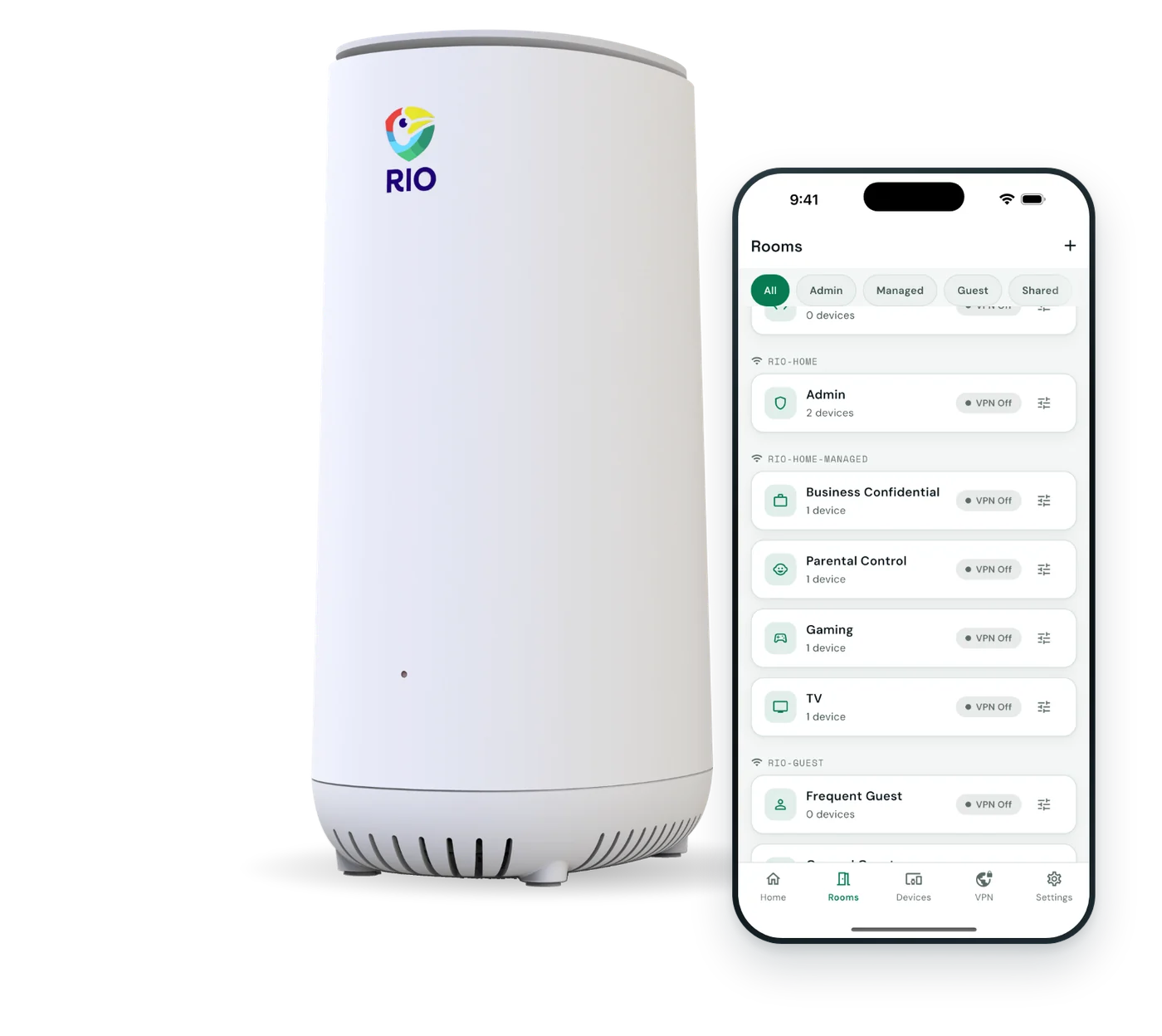
With Rio
Same house. Now a hacked gadget hits a wall.
Rio sorts your gadgets into walled-off SecureRooms, and nothing new joins without your OK.
- Old gadgets get their own roomWalled off from your computers and phones.
- Nothing joins without your OKEvery new device waits in the Rio app.
- Visitors get their own Wi-FiKept apart from your cameras and rooms.
How Rio sets up your rooms
An example smart home, room by room.
Rooms are walled off by default. Open a path between them only when needed.

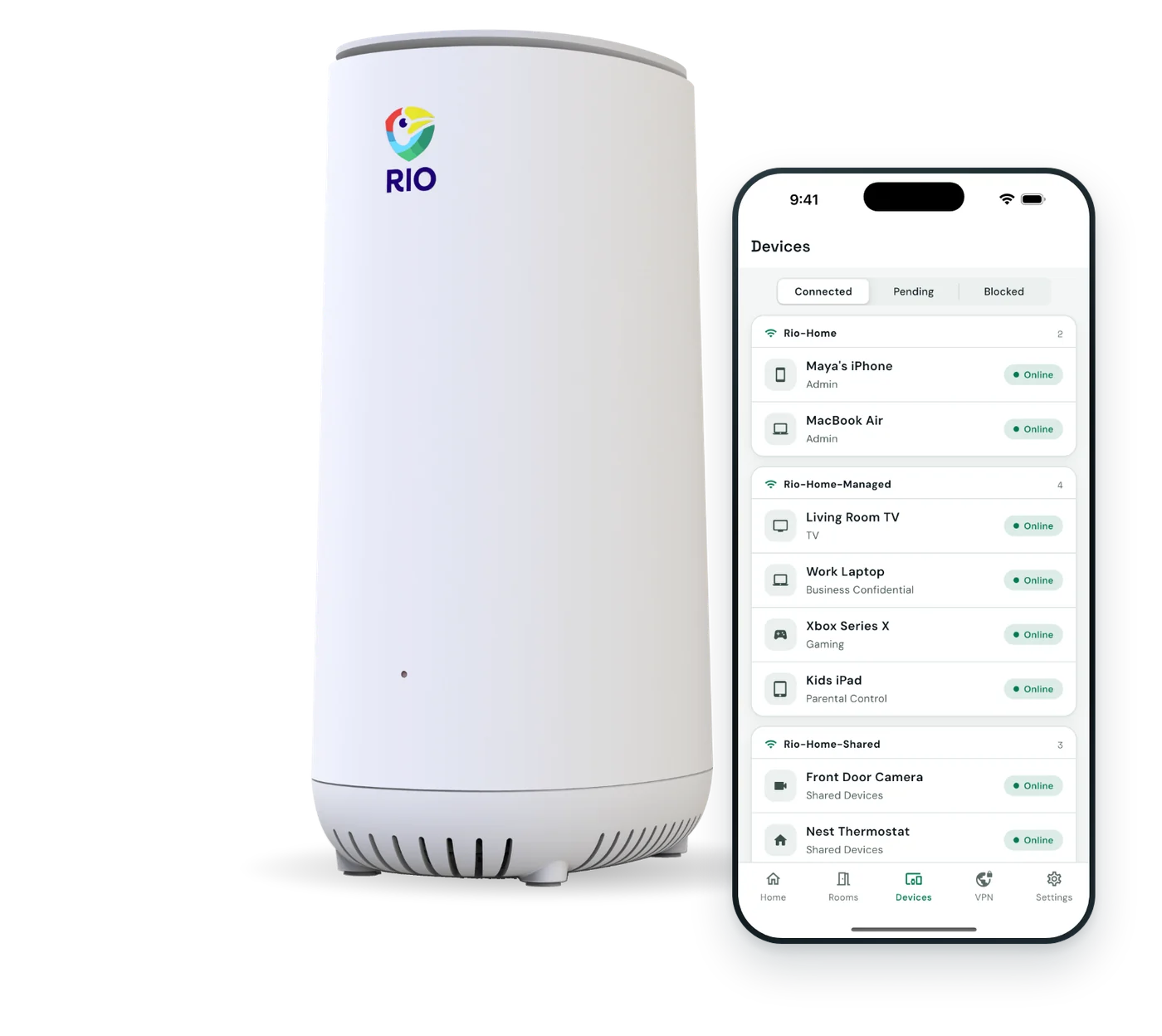
-
CamerasWalled off
- Doorbell
- Yard camera
- Garage camera
-
Smart homeWalled off
- Thermostat
- Smart plugs
- Bulbs
- Robot vacuum
-
EntertainmentVPN on
- Smart TV
- Console
- Speakers
-
WorkPrivate
- Work laptop
- Desktop
- Printer
-
FamilyPrivate
- Phones
- Tablets
- Watches
-
GuestsGuest Wi-Fi
- Visitors’ phones
Removed when they disconnect.
Example layout. Up to 16 SecureRooms, each with its own Wi-Fi password.
Move in at your own pace.
Quick setup, then bring devices over room by room.
Plug in behind your modem.
Rio replaces your current router. Scan the QR code on the back and follow the app.
Create your rooms.
Cameras, smart-home gear, entertainment, work. Up to 16 rooms, each with its own Wi-Fi password.
Approve and assign.
Approve each new device into its room, or block it. Add mesh for more range.
What Rio does, and doesn’t do.
You compare spec sheets. So here is ours, without the gloss.
| Topic | Rio handles it | Still on you |
|---|---|---|
| Old gadgets | Walled off from your computers | Updates still come from each gadget’s maker |
| Rooms | Up to 16 SecureRooms on 4 Wi-Fi networks | No separate 2.4 GHz network. Both bands share a name. |
| Attacks and ads | No intrusion detection or ad blocking | Add those separately if you need them |
| Thread and Zigbee | Not a Thread or Matter border router | Keep your hub for Thread and Zigbee |
| Capacity and range | 150+ devices, 38,000 sq ft with mesh | Placing units well. Walls cut range. |
Device count and coverage are rated figures. Walls and layout affect range. Rio’s Wi-Fi uses WPA2 Personal.
Smart home questions.
Different setup? Email our team and a real person will reply.
Should smart home devices be on a separate network?
It’s widely recommended. The FBI has advised keeping internet-connected gadgets on their own network, and CISA, the US cybersecurity agency, suggests putting internet-only smart devices on a guest network. Rio makes that practical with up to 16 SecureRooms.
How are SecureRooms different from a guest network?
Most routers give you a main network and a guest network. Rio gives you up to 16 rooms across 4 Wi-Fi networks, plus a dedicated guest network. Each room has its own Wi-Fi password and stays walled off unless you open a path.
Will my smart home apps still work?
Gadgets you control through the maker’s cloud app usually keep working from any room. Casting, screen mirroring and local control between rooms may need access opened between them. Plan rooms so devices that talk to each other sit together.
What happens if a camera or smart plug gets hacked?
It can only see what’s in its own room. A hacked camera in a cameras-only room can’t reach your laptop, phone or work files, because the rooms are walled off. No router can stop every attack, but Rio limits how far one can spread.
How many smart devices can Rio handle?
150+ at once on one Rio. Each new device waits for your OK, so a stray gadget can’t quietly join. For a large home, add more Rios on the same Wi-Fi name, up to 8 in all.
Can I give 2.4 GHz-only devices their own network?
Not today. Every Rio Wi-Fi network broadcasts on both 2.4 GHz and 5 GHz under one name. If a device won’t pair on a combined network, email us before you buy and we’ll tell you honestly whether Rio fits.
Will Alexa, Google Home or HomeKit still work?
Gadgets that run through the maker’s cloud usually do. Local control between devices in different rooms may need access opened between them, so keep devices that talk to each other in the same room.
Do I need to be technical to set up rooms?
No. The app walks you through setup in about 10 minutes, and adding a device to a room is a tap. Start with two rooms, gadgets and everything else, and add more whenever you like.
What does Rio cost?
$199.99, once, including 1 year of Rio VPN. After that, Rio VPN is optional at $7.99 a month or $79.99 a year. Free app updates, 30-day returns and a 1-year warranty.

Every gadget in its place.
Up to 16 SecureRooms, 150+ devices and device approval, on Wi-Fi 6.
$199.99includes 1 year of Rio VPN
- 1 year of Rio VPN
- 30-day returns
- 1-year warranty
- Free app updates