Rio for Older Adults
Nothing joins your Wi-Fi without your OK. It’s that simple.
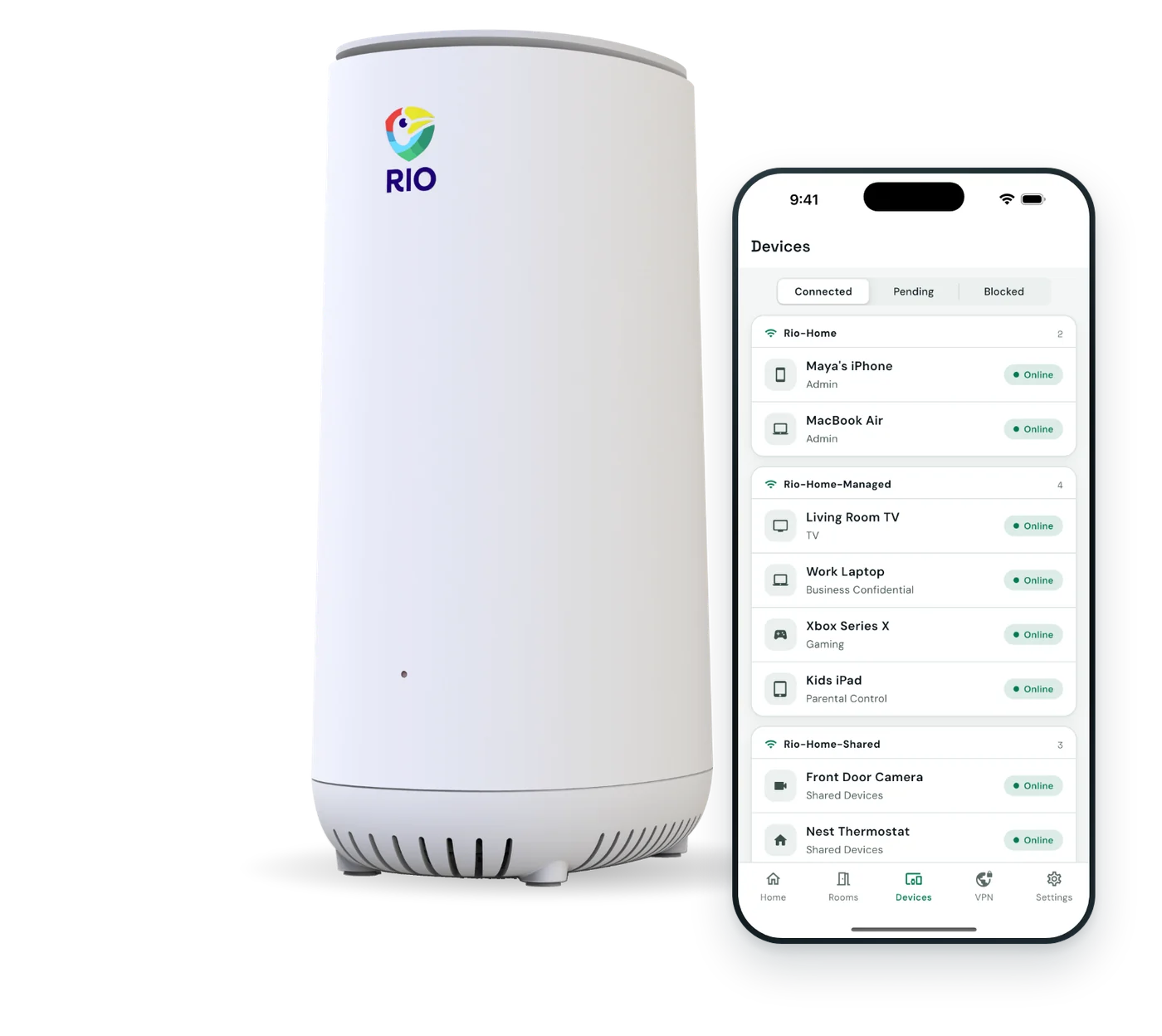
Rio is a Wi-Fi router with a simple app. Every new device waits for your OK, and visitors and grandkids get their own guest Wi-Fi.
- About 10 minutes to set up
- Real people on email support
- 30-day returns
Who else is on your Wi-Fi right now?
Most routers let any device with the password join quietly. Rio asks you first, and keeps visitors and gadgets apart.
- 10 attacks a day on the average home networkNETGEAR and Bitdefender, 2024
- 21 connected devices in the average US homeDeloitte, 2023
- $7.7B reported lost online by people over 60 in 2025, more than any other age groupFBI IC3, 2025
 Worst case
Someone outside is on your Wi-Fi. Nothing tells you.
Device approvalEvery new device waits until you tap Approve or Block in the Rio app.
 Worst case
There’s a device on your network. Nobody knows whose.
See every deviceThe Rio app shows each device, room by room, so you can block anything unfamiliar.
 Worst case
A visitor’s infected phone, on the Wi-Fi you bank on.
Guest Wi-FiVisitors and grandkids get their own guest Wi-Fi, apart from your phone and computer.


With Rio
Same home. Now nothing joins without your OK.
Every new device waits for you to tap Approve or Block, and visitors get their own Wi-Fi.
- You decide who joinsTap Approve or Block in the Rio app.
- See every deviceRoom by room, in plain words.
- Visitors get their own Wi-FiApart from the phone and computer you bank on.
How Rio sets up your rooms
Your home, sorted into rooms.
Rooms are walled off by default. Your phone and computer get their own room.

-
YoursPrivate
- Your phone
- Tablet
- Computer
Rio VPN can cover this whole room.
-
TV and speakersWalled off
- Smart TV
- Smart speaker
-
Home gadgetsWalled off
- Doorbell
- Thermostat
Kept apart from your phone and computer.
-
GuestsGuest Wi-Fi
- Grandkids’ phones
- Visitors’ tablets
Removed on disconnect. You let them back in.
An example setup. Up to 16 rooms, named however you like.
Up and running in about 10 minutes.
Do it yourself or with family. The app guides you.
Plug in behind your modem.
Rio replaces your current router. Scan the QR code on the back and follow the app.
Approve your devices.
Your phone, tablet and TV each ask to join. Tap Approve and choose a room.
Share the guest Wi-Fi.
Give visitors and grandkids the guest Wi-Fi. They stay apart from your devices.
What Rio does, and doesn’t do.
You deserve straight answers. Here’s where Rio helps, and where it can’t.
| Topic | Rio handles it | Still on you |
|---|---|---|
| New devices | Wait for your OK in the Rio app | Tap Approve or Block when asked |
| Visitors | Their own guest Wi-Fi, apart from yours | Letting returning guests back in |
| Travel | Rio VPN apps for iPhone, Android, Mac and Windows | Turning the app on when you’re away |
| Scams | Can’t stop calls, texts, phishing or fraud | Pause before you click or call back |
| Passwords and updates | Can’t guard passwords or update your devices | Two-step login, unique passwords, device updates |
What else helps: be wary of unexpected calls, texts or emails, and turn on two-step login for your important accounts.
Your questions, answered.
Questions? Email support@riorouter.com and a real person will reply.
Is Rio hard to set up if I’m not good with technology?
No. Rio goes behind your internet provider’s modem in place of your current router, and the Rio app walks you through each step. Plan on about 10 minutes. A family member can set it up with you, too.
Will Rio protect me from scams?
Not on its own. Rio secures your home network: new devices wait for your OK, and visitors and gadgets stay apart. It can’t stop scam calls, phishing emails or fraud. Be wary of unexpected calls or emails, and use two-step login on important accounts.
How do I know what’s connected to my Wi-Fi?
Open the Rio app. It shows your devices room by room. When something new tries to join, it waits for you to tap Approve or Block, and the app can alert you when a device is waiting.
What if I tap the wrong thing?
Devices you approve show up in the app, room by room, and you can move or remove them later. A new device that you ignore is declined after 5 minutes, so nothing joins by accident. Not sure? Email us and we’ll help.
Can my grandkids use the Wi-Fi when they visit?
Yes. Rio has a separate guest network for visitors, kept apart from your devices. Guests are removed when they disconnect, and you let returning guests back in from the app.
Can my family help me with Rio?
Yes. Many families set it up together, and a family member can sit with you while you do it. Our team is also a message away, and a real person will reply.
Do I have to pay every month?
No. Rio is a one-time $199.99, with your first year of Rio VPN included. Rio VPN is optional after that, and your Wi-Fi, guest network and device approval keep working without it.
Will my TV, tablet, smart speaker and doorbell still work?
Yes. They join Rio’s Wi-Fi like any router, and Rio is built for 150+ devices. Each one waits for your OK the first time, so nothing joins without you.
What if Rio isn’t right for me?
Send it back within 30 days. Every Rio also has a 1-year warranty and free app updates, so you’re covered either way.

Wi-Fi that asks you first.
Device approval, guest Wi-Fi and a simple app. Set up in about 10 minutes.
$199.99includes 1 year of Rio VPN
- About 10 minutes to set up
- Free shipping
- 30-day returns
- 1-year warranty